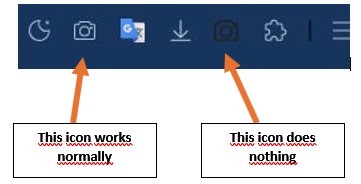
After installing version 4800, a second camera icon for screenshots appeared. The original is white and works fine. The new icon is black and doesn't work, but I can't find a way to remove it. I thought it might be a bug in version 4800, but this bug didn't occur on another PC. I then replaced version 4800 with version 5000, and the black icon still appears on the first PC, while it remains normal on the second.
I performed a second test on the PC affected by the black icon, moving the USER DATA folder to another location and launching Maxthon with no data. However, when I logged in with my username and password, all my settings (shortcuts, bookmarks, appearance, etc.) were lost. I then moved the copy of USER DATA back to the Maxthon folder, and everything was restored normally, but the black camera icon still appears and cannot be removed.
Then I tried replacing version 5000 with 3800, and the black icon still appeared, so I switched back to version 5000, and I'm back to square one.
All Maxthon versions I've used have always been the portable x64 versions for Windows 10.
Screenshot of the icon area: